
Skip to content
XESO
Home
Solutions
Enterprise & teamsVenture capitalFounder studiosUniversitiesKnowledge partnersUse cases
Pricing
Docs
Help centerRelease notesSee it workCompareSecurityRoadmapStatus
Sign in
Start free
Comparison

XESO vs NotebookLM

Both answer questions from saved sources. The difference is shape: NotebookLM organizes work into notebooks and selected source sets. XESO uses a persistent library and lets you choose an authorized scope for each question.
Start free
See pricing
Free for 25 notes · 14-day Pro trial · monthly launch pricing

XESOvsNotebookLM

Product peek

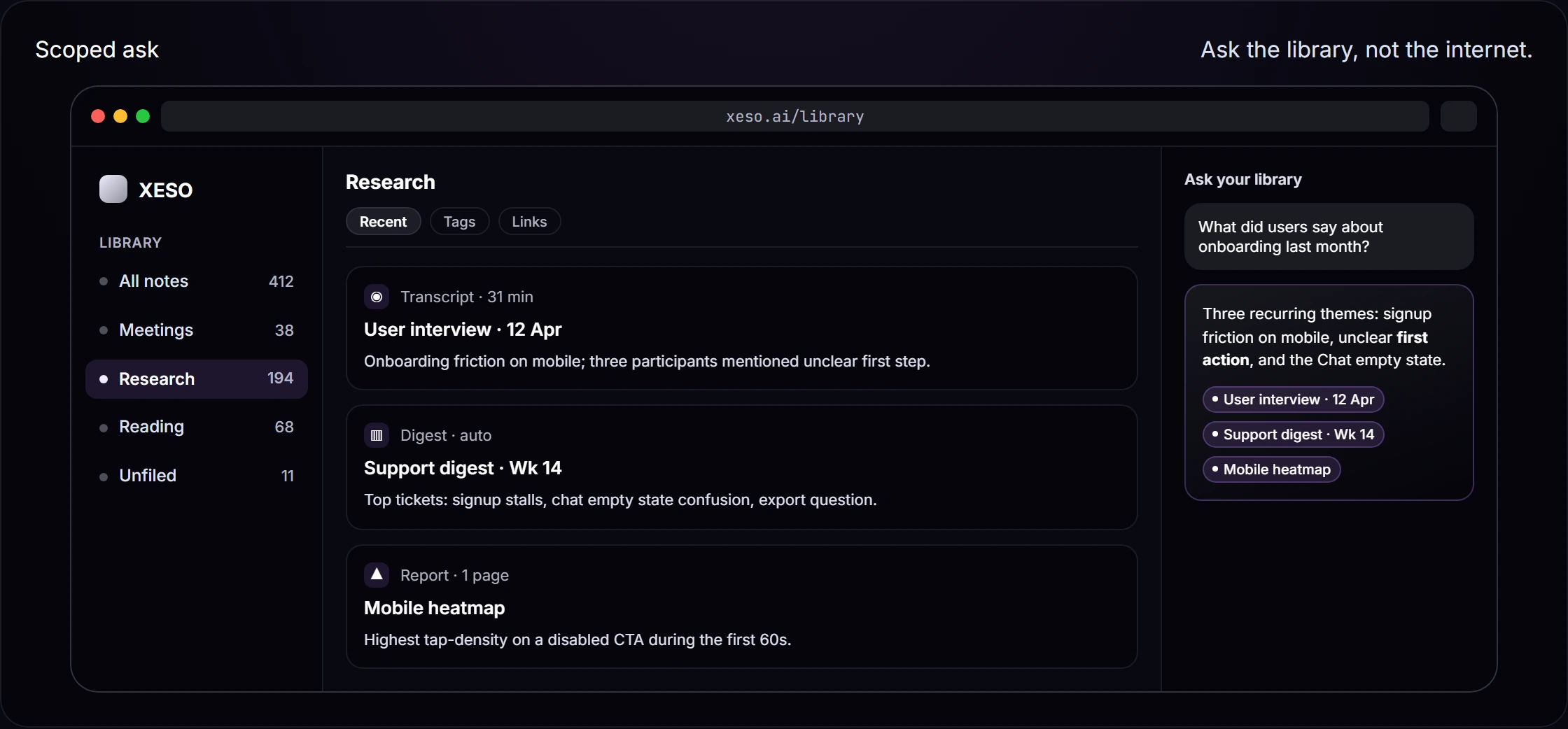
Ask across a persistent library.

The cited-answer surface stays tied to what you saved, so a source opens back into your own library instead of a throwaway upload set.

Product peek: Ask across a persistent library.; product screenshot

Which tool fits the job?

Choose by workflow, not a composite score
Choose XESO when…A persistent cross-topic library with notes, export, and cited retrieval.
Choose NotebookLM when…Focused analysis inside a bounded notebook and a Google-centered workflow.
  • Search the authorized sources in your selected library scope
  • Keep notes alongside imported sources and export supported content

Where NotebookLM wins

NotebookLM is a focused fit when a project has a bounded source set and you want source-grounded chat plus generated formats such as study guides or audio overviews. Google also integrates notebooks with parts of Gemini. Source types, limits, plan availability, and mobile support can change, so confirm them in Google’s current help documentation.

Where XESO wins

Ask across an authorized library scope, then inspect the available saved source location behind a cited answer.

How XESO grounds answers: the citation floor

XESO shows citation links on supported cited answers. If the available evidence is thin, it can say so rather than inventing support. Citation coverage varies by answer mode; open a citation to inspect the saved note passage behind it.
  • A persistent library with explicit scope. Choose the library, folder, or supported source context that should inform a question.
  • Inspectable support when citations are available. Open the cited source behind a supported answer; coverage varies by mode and source type.
  • Plan portability before you migrate. XESO supports Markdown note export. Check each product’s current export screen for exact formats and scope.
  • Choose by workflow. NotebookLM is strong for bounded source sets; XESO is designed for a persistent library with explicit retrieval scope.
  • Scope-aware chat with inspectable support. Choose an accessible library, folder, or note context, then open an available citation behind a cited answer.
  • Add from a responsive web app. Use the current Add menu for the supported links, files, and notes available on your device.
  • Use a preview before importing. Export supported files, then open Settings → Import → NotebookLM to review the currently supported import path, mapping, and duplicate handling.

Illustrative workflow, not live competitor output

Question: What sources support the argument about persistent memory?

XESO

Three notes in your library cite persistent memory directly: the literature review saved on 2026-03-10, the interview notes from March 22, and a paper saved last week.

Literature review — persistent memory

Stateless Q&A tools fail researchers who need answers across more than a single session upload.

NotebookLM

In a bounded-notebook workflow, you would ask within the selected notebook and organize sources around that focused project.

Confirm NotebookLM's current notebook, source, and export behavior in Google's official documentation before buying.

Illustrative workflow only; this is not a live NotebookLM output or benchmark.

Bring your own library

Sign in, add a supported source or note, and try the current cited-answer flow.
Start free
See plans
All comparisons →
XESO
Saves what you read. Pulls the right passage when you ask, with a link back to the source.
Product
  • Home
  • Pricing
  • Compare
  • Use cases
  • Help
  • See it work
Solutions
  • Enterprise & teams
  • Venture capital
  • Founder studios
  • Universities
  • Knowledge partners
  • Open supported citations to inspect the saved source
  • Editorial comparison. Confirm current plan details with each product before buying.

    Legal
    • Terms
    • Privacy
    • Refunds
    • DPA
    • Subprocessors
    Trust
    • Security
    • Portability covenant
    • Verify an export
    • Roadmap
    • Status
    Talk to usA human replies within one business day.
    • hello@xeso.aiAnything else
    • Help centerDocs & FAQs

    Product examples show their supporting source where a citation is part of the example.

    Site colophon: xeso.ai

    • Type. Inter for text; JetBrains Mono for code and citations.
    • Motion. Interactions are budgeted at 200ms or less, and prefers-reduced-motion collapses the rest.
    • Access. Keyboard-first navigation, visible focus rings, and a skip-to-content link on every page.
    • Stack. Built with Next.js.
    • No dark patterns. No fake countdowns, no pre-ticked boxes, no invented scarcity.
    © 2026 XESO · Built for researchers, founders, and journalists.